
Introducing the Decor8 AI API Playground: Take Virtual Staging API For a Test Drive!
- Akhilesh Joshi
- 2 days ago
- 11 min read

Updated: 2 days ago
The real estate and interior design industries are undergoing a massive transformation. What once required expensive photographers, professional stagers, and weeks of coordination can now be accomplished in seconds with artificial intelligence. Today, we're thrilled to announce the launch of the Decor8 AI API Playground — an interactive environment where developers, product managers, and entrepreneurs can explore, test, and integrate our comprehensive suite of AI-powered design APIs.
Whether you're building a real estate marketplace, a home improvement app, an interior design platform, or any application that could benefit from AI-generated room transformations, this playground is your starting point.
Why We Built the API Playground

Building with APIs shouldn't feel like stumbling in the dark. We've talked to hundreds of developers integrating AI services, and the frustrations are universal:
"I can't tell what the API actually does until I've written code"
"The documentation shows parameters but not real results"
"I spent hours integrating only to find out the output didn't match my needs"
The Decor8 AI API Playground eliminates these pain points entirely. Before writing a single line of code, you can:
Upload your own images and see exactly how each API transforms them
Experiment with every parameter — room types, design styles, color schemes, and more
View generated code snippets in Python, JavaScript, C#, and Dart
Save your generation history to compare results across different settings
Access direct links to detailed API documentation for each endpoint
Think of it as a sandbox where ideas become visual reality in seconds.
Getting Started: Your First API Call in Under 60 Seconds
Getting started couldn't be simpler:
Step 1: Get Your API Key
Visit prod-app.decor8.ai to create your free account and generate an API key. New accounts receive complimentary credits to explore the platform.
Step 2: Enter Your API Key

Paste your API key into the input field at the top of the playground. Click "Test" to verify your connection — you should see a green "Valid" status indicator.
Step 3: Choose an Endpoint and Upload an Image
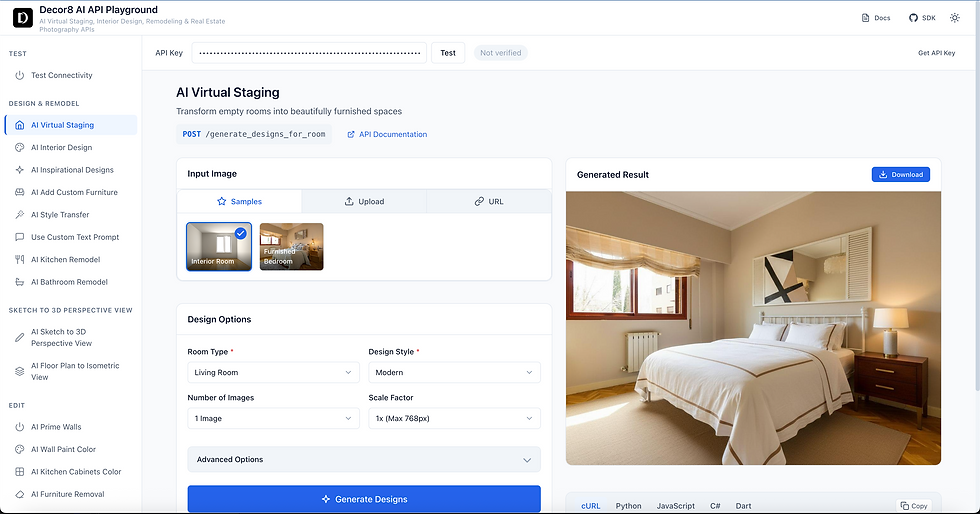
Select any endpoint from the sidebar, upload an image (or use one of our sample images), configure your options, and hit Generate. Within seconds, you'll see AI-transformed results.
Step 4: Copy the Code

Every request you make in the playground generates ready-to-use code snippets. Copy them directly into your application.
Deep Dive: Every API Endpoint Explained
The Decor8 AI platform offers 18 distinct API endpoints, each designed for specific real estate and interior design use cases. Let's explore what each one does and why it matters for your application.
AI Virtual Staging

Virtual staging is the flagship use case for real estate photography. Empty rooms are notoriously difficult to sell — buyers struggle to visualize furniture placement, room scale, and livability. Professional physical staging costs $2,000-$5,000 per property and takes days to coordinate.
What it does: Takes a photo of an empty or sparsely furnished room and fills it with photorealistic furniture, decor, and accessories appropriate for the room type and chosen design style.
Key parameters:
room_type: Living room, bedroom, kitchen, bathroom, office, and 25+ more options
design_style: Modern, Scandinavian, Industrial, Bohemian, Mid-Century Modern, and 30+ styles
num_images: Generate 1-4 variations per request
color_scheme: 20 curated color palettes or let AI choose automatically
Why it matters for your app:
Real estate platforms can offer instant staging to every listing
Property management companies can stage units before they're vacant
Photographers can upsell AI staging services
Home sellers can visualize their space's potential
Real-world impact: Properties with staged photos sell 73% faster and for 5-10% more than unstaged equivalents (National Association of Realtors).
AI Interior Design

Unlike virtual staging (which fills empty rooms), interior design transforms already-furnished spaces with new styles while maintaining the room's structure.
What it does: Reimagines existing furniture and decor in a completely new design aesthetic. The AI understands what's in the room and replaces items with style-appropriate alternatives.
Perfect for:
Home renovation planning apps
Interior design consultation platforms
"What would my room look like in [style]?" features
Real estate investors visualizing renovation potential
Pro tip: This endpoint is ideal for showing clients multiple design directions for the same space without any physical changes.
AI Inspirational Designs

Sometimes you don't have a photo — you just have an idea. Inspirational Designs generates beautiful, photorealistic room images from scratch based purely on your specifications.
What it does: Creates entirely new room visualizations without requiring an input image. Simply specify the room type, design style, and optional parameters.
Use cases:
Mood boards for design consultations
Marketing materials for furniture retailers
Concept visualization for architects
Social media content for design influencers
Placeholder images for real estate developments not yet built
Why it's powerful: No photography required. Generate unlimited design inspiration for any room type in any style, on demand.
AI Style Transfer

Design styles are often easier to show than describe. Style Transfer lets you use any image as a style reference, and the AI will transform your room to match that aesthetic.
What it does: Analyzes a reference image for colors, textures, furniture styles, and overall aesthetic, then applies those characteristics to your target room.
Game-changing for:
"I want my room to look like this Pinterest image"
Matching rooms to specific furniture catalog aesthetics
Recreating hotel or Airbnb designs clients loved
Consistent styling across multiple rooms/properties
Technical note: The reference image doesn't need to be the same room type. You can use a living room style to inspire a bedroom transformation.
Use Custom Text Prompt

For maximum creative control, describe exactly what you want in natural language. The AI interprets your text and generates accordingly.
Example prompt:
Add a comfortable dark grey sectional sofa with clean lines, a round marble
coffee table, two accent chairs in warm terracotta fabric, a large abstract
art piece above the sofa, floor-to-ceiling sheer white curtains, a textured
cream area rug, and warm ambient lighting with a modern arc floor lamp.
What it does: Parses your natural language description and generates a room matching your specifications as closely as possible.
Ideal for:
Clients with very specific visions
Designers who think in descriptions rather than style names
A/B testing different furniture arrangements
Custom requests that don't fit predefined styles
AI Add Custom Furniture

Want to see how a specific piece of furniture would look in a room? This endpoint places furniture from a reference image into your target space.
What it does: Takes a product image of furniture and intelligently places it into your room photo with proper scale, perspective, lighting, and shadows.
Revenue opportunities:
E-commerce "See it in your room" features
Furniture retailer AR alternatives
Interior design client presentations
Custom furniture manufacturer visualizations
Key benefit: Unlike generic AR solutions, the AI handles lighting and shadows automatically, creating photorealistic results.
AI Prime Walls for Painting
Before changing wall colors, sometimes you need to start with a clean slate. This endpoint "primes" walls by removing existing colors, wallpaper, and imperfections.
What it does: Transforms walls to a neutral, clean state — perfect for then applying new colors or allowing buyers to visualize their own choices.
Essential for:
Preparing rooms for wall color change visualizations
Removing dated wallpaper virtually
Showing "blank canvas" potential to buyers
Before/after renovation marketing
AI Wall Color Change

The fastest way to transform a room's mood is paint. This endpoint lets users visualize any wall color before buying a single gallon.
What it does: Intelligently identifies walls in the image and replaces their color while preserving textures, shadows, lighting, and architectural details.
Parameters:
new_color_description: Natural language color description (e.g., "warm terracotta", "navy blue", "sage green")
Integration ideas:
Paint retailer product pages
Home improvement store apps
Real estate "personalization" features
Color consultation tools
Why it beats alternatives: Unlike simple color overlay tools, the AI understands wall boundaries, handles shadows correctly, and preserves architectural details like moldings and trim.
AI Cabinet Color Change

Cabinet refinishing is one of the most impactful and cost-effective kitchen updates. Help users visualize the transformation before committing.
What it does: Identifies cabinets in kitchen or bathroom images and changes their color/finish while maintaining wood grain texture, hardware, and lighting.
Perfect for:
Kitchen remodeling apps
Cabinet refacing companies
Real estate renovation visualizations
Home improvement content creators
AI Remove Objects

Clutter kills real estate photos. Personal items distract buyers. Dated furniture undermines potential. This endpoint removes unwanted objects seamlessly.
What it does: Identifies and removes specified objects from room photos, intelligently filling the space with appropriate background (wall, floor, etc.).
Parameters:
objects_description: What to remove (e.g., "remove the old couch and floor lamp", "remove all furniture", "remove personal photos")
Critical for:
Decluttering listing photos
Removing personal items for privacy
Creating blank slate images for staging
Eliminating dated or damaged items from photos
AI Replace Sky

Exterior photography is at the mercy of weather. A stunning property photographed under gray skies loses its appeal. Sky replacement fixes this instantly.
What it does: Detects the sky in exterior photos and replaces it with beautiful alternatives — clear blue, golden hour, dramatic clouds, or twilight.
Parameters:
sky_type: "day" (clear blue), "dusk" (golden hour), "night" (twilight)
Why it matters:
83% of buyers start their search online
First impressions are formed in seconds
Curb appeal directly impacts perceived value
Best practices: Works on any exterior — homes, commercial buildings, vacation rentals, outdoor spaces.
AI Landscaping Design

Landscaping represents 10-15% of a home's value, yet it's often neglected in listings. This endpoint visualizes professional landscape designs for any outdoor space.
What it does: Transforms yards, gardens, patios, and outdoor spaces with appropriate plants, hardscaping, and design elements.
Parameters:
yard_type: Front yard, back yard, side yard
garden_style: Modern, Mediterranean, Japanese Zen, English Garden, Tropical, and more
Monetization opportunities:
Landscaping company lead generation
Nursery and garden center visualization tools
Real estate listing enhancement
Outdoor living space design apps
AI Kitchen Remodel

Kitchens sell homes. They're also the most expensive rooms to remodel. Help clients visualize transformations before investing $30,000+.
What it does: Reimagines kitchens with new cabinets, countertops, appliances, backsplashes, and layouts while maintaining structural elements.
Design styles include:
Modern minimalist
Traditional elegant
Farmhouse
Industrial
Contemporary
Transitional
Who needs this:
Kitchen remodeling contractors
Real estate investors (fix-and-flip visualization)
Home improvement retailers
Real estate agents marketing fixer-uppers
AI Bathroom Remodel

Bathrooms are the second most impactful rooms for home value. Visualize spa-like transformations that inspire renovation decisions.
What it does: Transforms bathrooms with new vanities, tiles, fixtures, lighting, and accessories while respecting the room's footprint.
Key differentiator: The AI understands bathroom-specific elements — wet areas, tile patterns, fixture placements, mirror/lighting relationships.
AI Sketch to Render

Bridge the gap between concept and visualization. Turn hand-drawn sketches, wireframes, or rough concepts into photorealistic renders.
What it does: Interprets architectural or interior design sketches and generates photorealistic visualizations that bring concepts to life.
Parameters:
room_type: What type of room the sketch represents
design_style: Desired aesthetic for the render
Invaluable for:
Architects presenting to clients
Interior designers in early concept stages
Students visualizing projects
Contractors explaining renovation plans
Pro tip: Works with various sketch qualities — from rough napkin drawings to detailed architectural sketches.
AI Floor plan to Isometric

What it does: Converts 2D architectural floor plans into 3D isometric visualizations with furniture, lighting, and realistic textures.
Why isometric?
Shows spatial relationships clearly
Reveals room proportions
Helps visualize furniture fit
More engaging than 2D plans
Perfect for:
Real estate listings
Architectural presentations
Property developer marketing
Interior design consultations
AI Image Upscaling
Low-resolution images plague real estate listings — smartphone photos, old MLS images, screenshots. AI upscaling restores detail and clarity.
What it does: Increases image resolution up to 8x while intelligently adding detail, sharpening edges, and reducing artifacts.
Scale factors:
1x-2x: Standard enhancement (included in base credits)
3x-4x: High resolution (additional credits)
5x-8x: Ultra high resolution (additional credits)
When to use:
Enhancing old listing photos
Preparing images for print materials
Improving smartphone photos for professional use
Rescuing low-quality source images
The Code Panel: From Playground to Production
Every action in the playground generates production-ready code. We support the languages and frameworks developers actually use:

cURL
For quick terminal testing and shell script integration.
Python
Using the requests library — perfect for data pipelines, backend services, and Jupyter notebooks.
JavaScript
Fetch API implementation for Node.js and browser applications.
C# / .NET
HttpClient implementation for enterprise applications and Unity projects.
Dart
For Flutter developers building cross-platform mobile apps.
Bonus: We maintain official SDKs for Python, JavaScript, C#, and Dart that handle authentication, error handling, and response parsing automatically.
Generation History: Your Visual Experiment Log
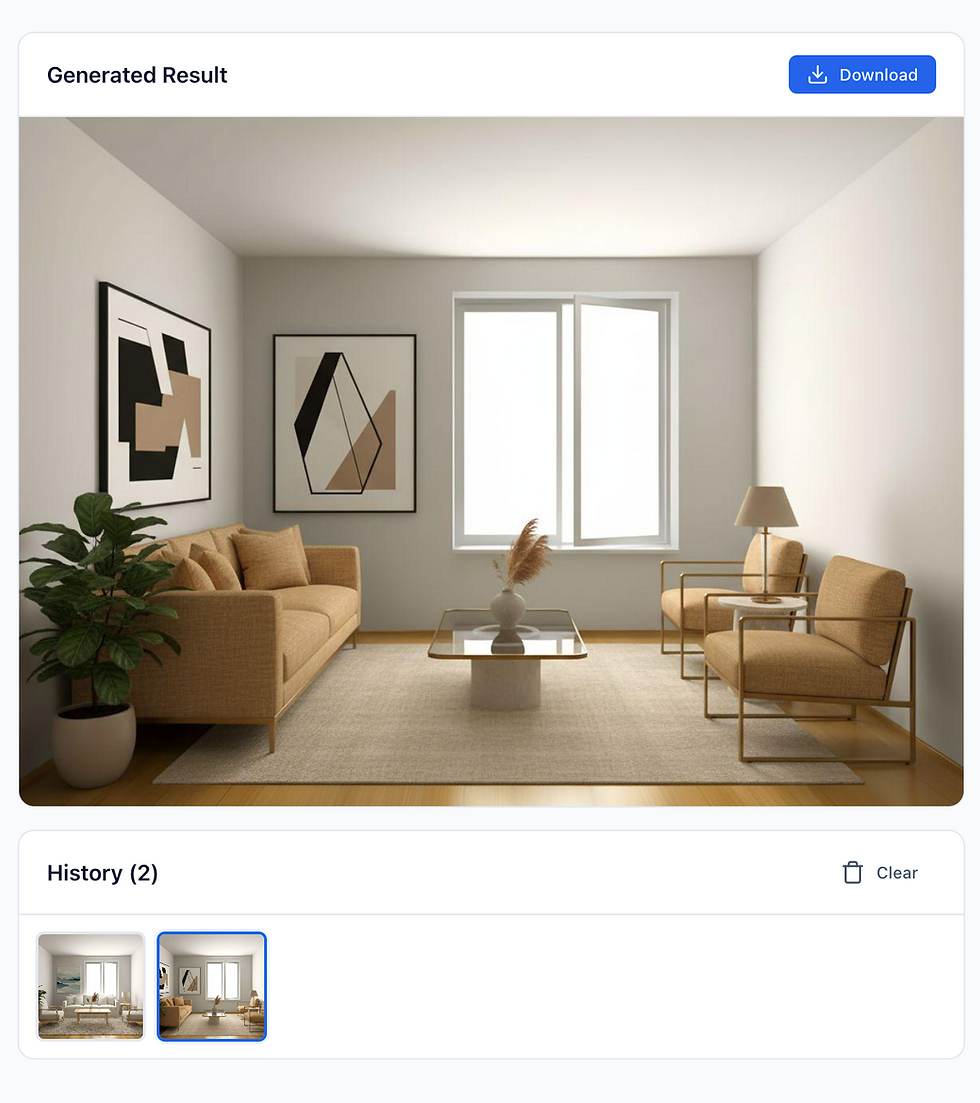
Every image you generate is automatically saved to your browser's local storage (persisted for 24 hours). This means you can:
Compare different parameter combinations side by side
Return to previous sessions without regenerating
Share results by downloading images directly
Track your experimentation across multiple settings
Click any thumbnail in the history strip to instantly view that generation's results.
Who Should Use the Decor8 AI API?
Real Estate Platforms & MLSs
Offer virtual staging as a value-add for every listing. Differentiate your platform with AI-enhanced photography that helps properties sell faster.
Property Technology (PropTech) Startups
Build renovation visualization, design consultation, or property marketing features without training your own AI models.
Home Improvement Retailers
Let customers visualize paint colors, cabinet finishes, and design styles in their own spaces before purchasing.
Interior Design Software
Add AI-powered visualization to design tools, mood board creators, or client presentation software.
Photography & Media Companies
Offer AI enhancement services to real estate photographers, expanding service offerings without additional equipment.
Real Estate Investors & Flippers
Visualize renovation potential before purchasing properties. Create compelling "after" visualizations for marketing.
Architecture & Construction Firms
Transform sketches to renders, visualize completed projects, and enhance client presentations.
Why Decor8 AI vs. Building Your Own
We frequently hear: "Couldn't we just use Stable Diffusion or Midjourney directly?"
Here's the reality:
Consideration | DIY/Foundational Models | Decor8 AI API |
Setup time | Weeks to months | Minutes |
Infrastructure | GPU servers, scaling, monitoring | Fully managed |
Consistency | Highly variable outputs | Optimized for real estate |
Specialization | General purpose | Purpose-built for interiors |
Maintenance | Ongoing model updates | We handle everything |
Cost | $1000s/month minimum | Pay per generation |
Support | Community forums | Dedicated support |
The bottom line: Unless AI image generation is your core product, the time and cost of building and maintaining your own solution far exceeds using a specialized API.
Pricing That Scales With You
Decor8 AI uses a simple credit-based system:
Most endpoints: 1 credit per generation
High-resolution upscaling: Additional credits based on scale factor
Bulk discounts: Available for high-volume applications
Visit Decor8 AI API Pricing to view current pricing and visit for Decor8 AI API developer resources.
Start Building Today
The Decor8 AI API Playground is live and ready for you to explore:
Open the Playground — No installation required
Get Your API Key — Free account with starter credits
Read the Documentation — Comprehensive API reference
Explore the SDKs — Official libraries for Python, JS, C#, Dart
Have questions? Ideas? Feedback? We'd love to hear from you. Reach out through our support channels or connect with us on GitHub.
What's Next
The playground you see today is just the beginning. We're actively developing:
Batch processing tools for high-volume operations
Comparison views for side-by-side parameter testing
New AI capabilities we can't wait to share
Bookmark the playground and check back often — we ship improvements weekly.
Ready to transform how your application handles real estate photography and interior design? The Decor8 AI API Playground is waiting.


Comments