
A Real Estate Agent's Guide to Virtual Staging for Real Estate
- oliverjames0609
- 3 days ago
- 16 min read
Ever tried to sell a book with a completely blank cover? That's what it feels like trying to market an empty house. When potential buyers are scrolling through hundreds of online listings, a vacant room just doesn't grab their attention. It can feel cold, sterile, and it makes it incredibly difficult for someone to imagine themselves living there.
That's where virtual staging comes in. It’s the art of using software to digitally add stylish furniture, decor, and other design touches to photos of an empty property. Think of it as a digital makeover that turns a blank canvas into a warm, welcoming home that buyers can actually connect with.
What Is Virtual Staging and How Does It Work?
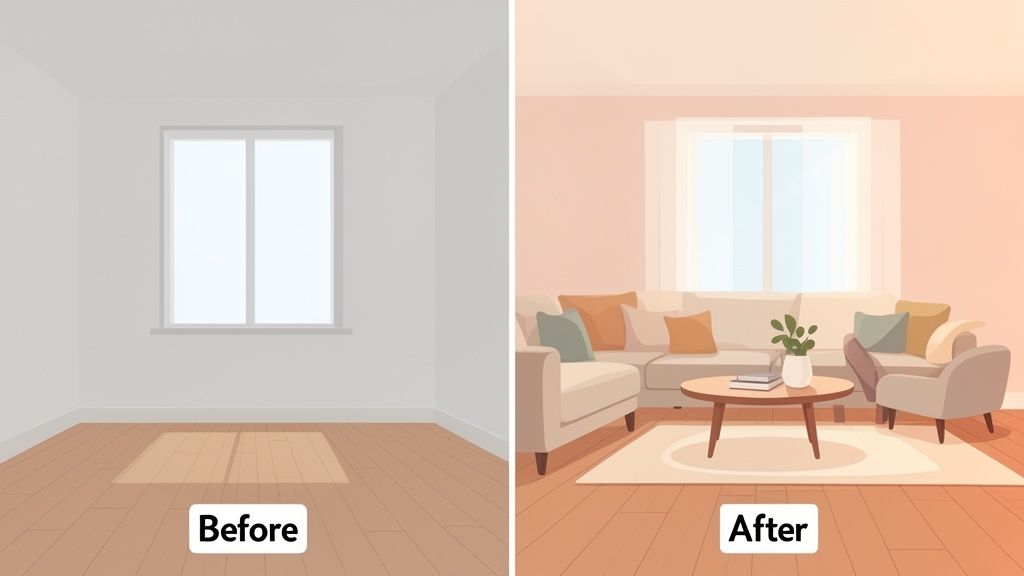
Virtual staging is a powerful marketing tool that closes the gap between what a property is and what it could be. Instead of seeing plain floors and bare walls, a buyer sees a potential life unfolding—a cozy living room for movie nights or a bright, functional home office.
It helps buyers answer the critical questions they can't always figure out from an empty photo: "Will my king-sized bed fit in this room?" or "Where would we put the dining table?" By showing a fully furnished space, you're not just selling a house; you're selling a vision.
The Basic Process Explained
The idea behind it is pretty straightforward. You start by taking high-quality photos of the empty rooms. These images are then uploaded to a virtual staging platform, where digital artists or sophisticated AI programs work their magic. They place photorealistic 3D models of furniture, rugs, art, and even plants into the photo.
The secret to making it look real is all in the details. A good virtual stager focuses on:
Scale and Proportion: Making sure a sofa doesn't look comically large or a coffee table ridiculously small for the room.
Lighting and Shadows: Carefully matching the shadows of the digital furniture to the natural light coming from the windows.
Style Cohesion: Choosing furniture and decor that fit the home's character and appeal to its most likely buyer.
When it's done right, you get a stunning, magazine-worthy photo that highlights the home's best assets and makes it pop in a crowded online marketplace. You can dive deeper into the technology and see a more detailed breakdown by exploring how AI virtual staging works.
With 97% of buyers now starting their home search online, that first digital impression isn't just important—it's everything. An empty room simply doesn't tell a story or spark the imagination needed to get someone to book a viewing.
A Critical First Impression
This isn't just about making pretty pictures; it's a strategic move that directly impacts the entire sales process. Presenting a property at its absolute best from the very first click drums up more interest, drives more foot traffic, and ultimately leads to quicker sales. This approach is part of a larger trend in digital marketing, which you can see in everything from simple photo edits to immersive virtual tours for luxury European real estate.
The numbers don't lie. Virtual staging has been a game-changer for speeding up sales. In fact, market analysis has shown that staged homes can sell up to 73% faster than their empty counterparts. That can mean the difference between sitting on the market for 90 days and closing a deal in just 24.
Virtual Staging vs. Traditional Staging
When you're getting a property ready for the market, one of the biggest decisions you'll make is how to show it off. For years, the only real option was traditional staging—renting truckloads of furniture and hiring designers to arrange it all. But now, virtual staging for real estate offers a digital-first approach that gets the same job done with a lot less time, money, and hassle.
Let's be honest: traditional staging is a huge logistical puzzle. You have to find and hire an interior designer who gets the home's vibe. Then comes the coordination with furniture rental companies, scheduling movers, and finally, getting a photographer in. The whole production can easily drag on for weeks, juggling multiple vendors to get everything just right.
Now, compare that to the virtual staging workflow. It’s incredibly straightforward. You start with good photos of the empty rooms, upload them to a platform like Decor8 AI, pick a design style you love, and get back beautifully furnished images. We're talking hours, not weeks. That kind of speed completely changes how quickly you can get a listing live.
A Head-to-Head Comparison
To really see the difference, it helps to put the two methods side-by-side. The contrast in cost, speed, and flexibility is pretty eye-opening and shows why so many agents are making the switch.
Here’s a quick breakdown of how they stack up against each other.
Factor | Virtual Staging | Traditional Staging |
|---|---|---|
Average Cost | $30 - $300 for an entire property | $1,500 - $7,000+ depending on home size |
Timeline | 12 - 48 hours from photo to finished image | 1 - 3 weeks for consultation, delivery, and setup |
Logistics | Upload photos to a single online platform | Manage designers, movers, and rental companies |
Flexibility | Instantly change styles or furniture with a few clicks | Physically moving heavy furniture to change the look |
Physical Access | None required after the initial photoshoot | Multiple visits needed for setup and removal |
As you can see, the financial difference is massive. Industry data consistently shows that virtual staging can be up to 97% cheaper than hauling in physical furniture. If you want to get into the nitty-gritty, we put together a complete guide on the cost analysis of virtual vs traditional staging that breaks down all the numbers.
Flexibility and Return on Investment
Beyond the massive savings, virtual staging gives you a kind of creative freedom that’s just not possible with traditional methods.
Think about that spare bedroom that could be a deal-maker for different types of buyers. With virtual staging, you can show off that one room in several ways:
As a cozy nursery perfect for a young family.
As a sleek home office for a remote professional.
As a comfortable guest bedroom for when family visits.
This lets you target your marketing to specific people without spending an extra dime or lifting a single piece of furniture. It’s all about showing a home's potential in a dynamic way that a static, physically staged room just can't.
The real goal of staging, whether you’re using software or a sofa, is to help buyers see a property as their future home. An empty room asks them to use their imagination. A well-staged space does the heavy lifting for them, sparking an immediate emotional connection.
At the end of the day, both methods are about making a property look its best. To see why virtual staging is such a smart move, it helps to know the thinking behind the traditional real estate staging secrets that pros have used for years. The goal hasn’t changed, but the tools certainly have. Virtual staging is simply a modern, efficient, and cost-effective way to get there—one that’s perfectly suited for today’s fast-moving market.
Why Virtual Staging Is a Game Changer for Agents and Sellers
In real estate, your digital storefront is everything. It's the first place buyers connect with a property, and that first impression can make or break their interest. This is where a home either grabs their attention or gets scrolled past and forgotten. Virtual staging for real estate isn't just a neat trick to make empty rooms look furnished—it's a powerful business strategy that gives agents a competitive edge and helps sellers earn more.
Think about it from an agent's perspective. When you walk into a listing presentation and offer virtual staging, you’re showing the homeowner you understand modern marketing. You’re not just promising to sell their home; you’re presenting a concrete plan to showcase it beautifully online. That immediately positions you as a forward-thinking expert, setting you apart from agents still using the same old playbook.
For sellers, the benefits hit the bottom line directly. A small investment in virtual staging can translate into a much higher selling price. In fact, professionally staged homes often sell for 5% to 23% more than empty ones. Why? Because staging builds an emotional bridge, helping buyers envision their future in the space and motivating them to make a stronger offer.
Maximizing a Property's Potential
One of the best things about virtual staging is its incredible flexibility. With physical staging, you're stuck with one look. But with digital tools, you can show off a room's potential in multiple ways to attract a much broader range of buyers.
Imagine a spare room in a home. With virtual staging, you can market that single space to different people without spending an extra dime:
For a growing family: You can stage it as a bright, welcoming nursery.
For professionals working from home: It becomes a quiet, productive home office.
For those who love to host: You can show it as a cozy guest bedroom.
This kind of targeted marketing would be outrageously expensive with traditional staging. You’re no longer selling just four walls; you’re selling different lifestyles that a buyer can instantly connect with.
An empty room asks a buyer to do all the work. A virtually staged room does that work for them, creating an immediate vision of "home" that can be the difference between a quick scroll and a scheduled tour.
This infographic breaks down exactly how the two methods stack up in terms of cost, time, and logistics.
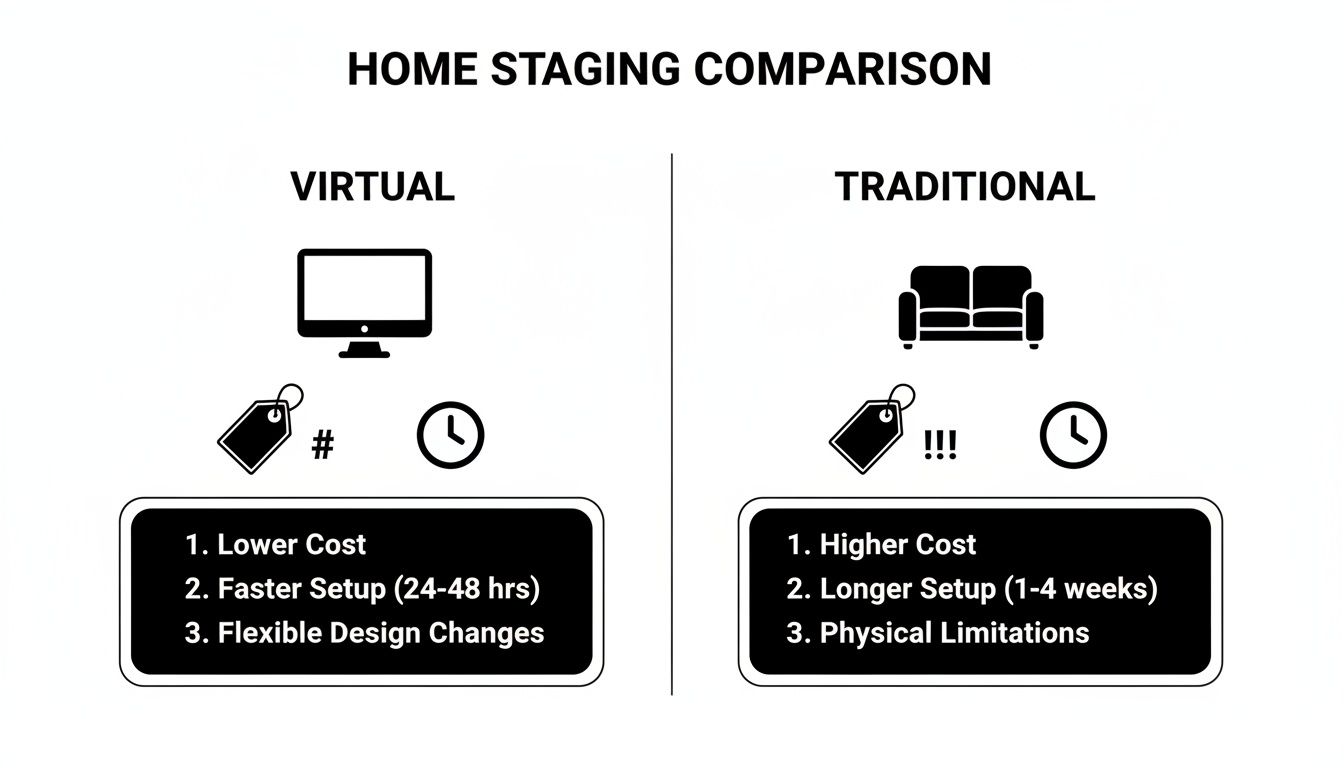
As you can see, the virtual approach completely bypasses the high costs and logistical headaches of renting and moving physical furniture.
Driving Faster Sales and Reducing Costs
Besides bringing in a higher price, speed is a massive advantage. Every day an empty house sits on the market, it costs the seller money in mortgage payments, taxes, and utilities. The numbers don't lie: homes with virtual staging spend 73% less time on the market. They move faster.
A quicker sale means thousands of dollars saved for your client. By investing a small amount upfront in digital presentation, sellers can drastically cut the carrying costs of a property that just won't sell. This makes virtual staging one of the clearest and most powerful returns on investment in real estate. As an agent, explaining this value is key, and you can find more strategies in our guide on virtual staging for realtors. At the end of the day, it turns the selling process from a passive waiting game into a focused strategy for attracting the right buyers and closing the deal.
Getting Started with AI Virtual Staging
Diving into virtual staging for real estate is a lot easier than you might think. Forget needing an interior design degree—modern AI platforms are built to be incredibly intuitive, letting just about anyone turn a vacant room into a beautifully furnished space. Let's walk through the actual steps, using a tool like Decor8 AI as our example, so you can see how to get professional-grade results yourself.
The whole point is speed and efficiency. Instead of juggling schedules with designers and waiting weeks for photos, you can go from an empty room to a stunning, listing-ready image in minutes. This really puts the power back in the hands of agents and homeowners to create their own marketing visuals on the fly.
Step 1: Understanding the Core Features
Before you even upload a photo, it helps to know what these AI tools are actually capable of. The real magic isn't just plopping a couch into a picture; it's how the AI understands the room itself. It sees the walls, floors, windows, and even the light sources, then intelligently places furniture to create a realistic, cohesive scene.
Most of the new platforms come packed with features designed to solve common real estate marketing problems.
Instant Item Removal: This is your clean slate button. You can digitally erase old furniture, random clutter, or anything left behind, giving you a perfect blank canvas to work with.
Vast Style Libraries: No more guessing what looks good. You can pick from dozens of professionally curated design styles. Need a cozy "Modern Farmhouse" vibe for a suburban home? Or a sleek "Scandinavian" look for a city condo? The right feel is just a click away.
Text Prompt Customization: If you have a specific vision, you can just tell the AI what you want. A simple prompt like, "add a plush navy blue sofa, a light oak coffee table, and a large abstract painting on the main wall," gives you a highly customized result.
These features work together to give you total creative control, so you can craft visuals that truly connect with the buyers you’re trying to attract.
Step 2: The Simple Three-Step Workflow
Getting your first virtually staged photo is a refreshingly simple process. There’s no technical wizardry required. It’s really just three quick steps, from uploading your image to downloading the final result. The most important part? Starting with a good, clean photo of the empty room. That’s your foundation for a great outcome.
Here’s a peek at the kind of straightforward interface you'll find on a platform like Decor8 AI, which makes the whole thing a breeze.

As you can see, you just upload your image and start applying different styles and edits right in the tool.
The entire workflow is designed to be seamless, breaking a complex design task down into a few manageable clicks.
Upload Your Photo: Start by grabbing a high-quality, well-lit photo of the empty room. You can drag and drop it right from your computer or phone.
Choose Your Style or Use a Prompt: This is the fun part. Pick a design style from the library, or get creative and type in a text prompt describing the furniture and decor you imagine for the space.
Generate and Refine: In seconds, the AI will generate a fully furnished image. If it’s not quite right, just tweak your prompt or try a different style to generate new options until it's perfect.
A huge plus is that the best AI staging platforms are cloud-synced. You can start a project on your desktop at the office and make final tweaks on your phone or tablet while you're out and about. Your workflow never has to stop.
Step 3: Achieving Magazine-Quality Results
The ultimate goal here is to create an image so realistic it’s impossible to tell from a professionally staged photograph. Today's AI is exceptionally good at this because it sweats the small stuff—things like lighting, shadows, and reflections. The AI analyzes the light in your original photo and makes sure every piece of digital furniture casts a shadow that looks completely natural, grounding it in the room.
That level of realism is what builds an instant emotional connection with buyers. When they see a space that feels warm, inviting, and genuinely livable, they're much more likely to book a showing.
If you want to see the impact firsthand, you can get your feet wet with a free AI interior design tool) that lets you add furniture to empty rooms without any commitment. It’s a fantastic, hands-on way to see what's possible.
How to Market Your Virtually Staged Listings Effectively

Creating beautiful, virtually staged photos is really just the beginning. The real magic happens when you use these visuals to grab a buyer's attention and get them to book a tour. It’s not just about showing a pretty picture; it’s about telling a story, building trust, and helping buyers truly picture themselves living in the space.
And the most important part of that? Being transparent. Buyers value honesty, and frankly, industry rules demand it. You should always disclose that your images are digitally staged. Think of it not as a confession, but as a mark of a professional using the latest marketing tools.
The Golden Rule of Disclosure
Trust is the currency of real estate. Being upfront about using virtual staging for real estate listings means no one is caught off guard when they walk into an empty home. It sets the right expectations from the start and proves you're an agent who operates with integrity.
Most MLS boards have specific rules requiring disclosure. A small, clear watermark or a simple sentence in the photo caption is typically all you need to stay compliant.
A great strategy is to include both the staged and the empty photos in your listing gallery. This gives buyers the best of both worlds: they see the home's full potential and also understand its current, unfurnished condition.
This approach doesn't just check a regulatory box—it strengthens your credibility. It positions virtual staging as a helpful visualization tool, not an attempt to mislead.
Crafting Compelling Listing Narratives
Your virtually staged photos are the perfect jumping-off point for your property descriptions. Instead of just rattling off room dimensions, you can now paint a picture of the lifestyle the home offers.
Spark Emotion: Let the visuals guide your words. For a room staged as an office, you could write, "Imagine your morning commute ending here, in a sun-drenched home office with plenty of room to think and create."
Show the Possibilities: If you staged a flex space in multiple ways, tell them! "We've shown this versatile room as both a cozy nursery and a home gym, but it's ready to adapt to whatever your family needs."
Solve a Problem: Use the staging to address a potential buyer concern. For a smaller living room, you might say, "As you can see, this living room easily fits a full-sized sofa and chairs, creating the perfect spot for movie night."
Boosting Your Reach on Social Media
Virtually staged images were practically made for social media. They're eye-catching, shareable, and designed to stop the scroll.
Get creative with your content. Try a "before-and-after" carousel on Instagram, swiping from the empty room to the stunning staged version. You could also run a poll asking your followers which design style they prefer for the main bedroom. Little interactive posts like these can seriously boost engagement and keep your listing on people's minds.
When you post, use your captions to tell the story of the transformation. You’re not just sharing a property photo—you’re creating engaging content that showcases both the home's potential and your smart marketing, driving more eyes to your listing and, ultimately, more feet through the door.
Scaling Virtual Staging Across Your Business
Staging one home is great. But what if you’re juggling an entire portfolio? For a growing real estate agency, a busy photography business, or a developer with dozens of new units, staging photos one by one just isn’t going to cut it. That's when you need to think bigger and scale up your virtual staging for real estate. It’s about making it a core part of your operation, not just a one-off marketing trick.
The real leap forward comes when you move past single-image tools. The goal is to build a smooth, repeatable process that can handle a flood of images—hundreds, even thousands—without you having to put in a proportional amount of work. This is how you deliver consistently beautiful staging across every single project, save a ton of time, and make your business more profitable.
Automate Your Workflow with APIs and SDKs
When you're dealing with a high volume of images, automation is your best friend. Instead of manually uploading and tweaking photos, you can plug virtual staging technology right into the software you already use with an Application Programming Interface (API). Just think of an API as a bridge that lets your system "talk" directly to a platform like Decor8 AI.
This opens up so many doors. For instance, a real estate photography business could set up a system where as soon as a photographer uploads their shots, the images are automatically sent off to be virtually staged. No more manual hand-offs or wasted time.
This kind of direct connection cuts out tedious steps and makes turnaround times incredibly fast. Developers can wire these tools into their property management software, and agencies can link them to their marketing platforms. The benefits are pretty clear:
Bulk Processing: You can send a huge batch of photos to be staged all at once, instead of feeding them in one by one.
Seamless Integration: The staging tools can live right inside your own dashboards, client portals, or even mobile apps.
Consistent Branding: You can automatically apply your signature styles to every image, keeping your portfolio looking polished and uniform.
For businesses wanting to build something truly unique, Software Development Kits (SDKs) offer the raw components to embed staging features deep into your own custom applications. If you're curious, you can check out a full breakdown of the top APIs for virtual staging integration and see which one fits your needs.
No-Code Solutions for Easy Integration
Don't worry, you don't need a computer science degree to make this work. If you’re like most businesses, you probably use a popular website builder to manage your online presence. That's where no-code solutions come in—they make this kind of integration ridiculously simple.
With no-code plugins, your website can go from being a static online brochure to an interactive hub. You can offer virtual staging directly to your clients as a valuable service, all without touching a single line of code.
Let’s say you’re an agent with a WordPress site. You could install a simple plugin that adds a virtual staging portal right onto your website. Your team or even your clients could upload their photos there and get the finished images back, all through an interface they already know.
Here are a few popular no-code options:
WordPress Plugins: Add a staging submission form or a complete client portal to the most widely used website platform in the world.
Wix Apps: Weave virtual staging tools directly into your Wix site to offer new services to your visitors.
Bubble Connectors: Use a visual, drag-and-drop interface to build a completely custom web app packed with powerful staging features.
By putting these kinds of scalable systems in place, you can stop treating virtual staging as a manual chore. It becomes an automated, efficient, and very profitable engine for your business.
Common Questions About Virtual Staging
Whenever you introduce a new tool into your workflow, you're bound to have questions. When it comes to virtual staging for real estate, the big ones usually center on transparency, realism, and how to get the best possible results. Let's dig into what agents and sellers are asking.
The most common concern is about the legal and ethical side of things. Is it okay to do this? The short answer is yes, virtual staging is perfectly legal and has become a standard industry practice. The golden rule, however, is full disclosure. Most MLS boards insist that you clearly label any modified images as "virtually staged." Ethically, you're trying to show a home's potential, not cover up its problems. You can't use it to hide a crack in the wall or digitally remove a built-in appliance you don't like.
How Does the AI Make it Look So Real?
It's natural to wonder how a computer can generate such convincing images. It’s not just about plopping a 3D model of a sofa into a picture. Smart AI platforms first analyze the photo you provide, identifying the room's light sources, where the windows are, and how shadows fall naturally.
From there, the AI renders furniture with its own realistic lighting and shadows that perfectly match the environment of the room. This is the secret sauce—it’s what makes the digital furniture look like it truly belongs in the space, not like a sticker slapped on top of a photo.
Pro Tip: The best way to build trust with potential buyers is to show them everything. Include both the beautifully staged photos and the original photos of the empty rooms in your listing. This way, they can see the home's amazing potential and its current, real-life condition.
What Kind of Photos Give the Best Results?
Like any creative process, the quality of your final result depends on the quality of what you start with. Great virtual staging begins with great photography.
Here are a few simple tips for the initial photoshoot:
Go High-Resolution: You need sharp, clear photos. This allows the AI to accurately see the details of the room, from the texture of the floors to the trim around the windows.
Let There Be Light: A bright, well-lit room is your best friend. Natural light always produces the most realistic and inviting final images.
Shoot from a Corner: This is a classic real estate photography trick for a reason. An angled shot from a corner usually captures the most of the room and gives a great sense of the space, making it easier to stage.
Finally, make sure the room is completely empty and clean before you take the picture. While some AI tools can digitally remove existing furniture, you will always get the most photorealistic results by starting with a truly blank canvas.
Ready to turn those empty listings into homes that buyers can't wait to see? With Decor8 AI, you can create stunning, photorealistic visuals in just a few seconds. Explore our powerful AI virtual staging tools and start for free today!
Comments