
Interior Design Software for Beginners Made Simple
- oliverjames0609
- 2 days ago
- 12 min read
Feeling a little intimidated by the thought of redesigning your space? You're definitely not alone. The best interior design software for beginners is like having a digital sandbox for your home. It’s a place where you can play with layouts, colors, and furniture without any real-world consequences or costs.
Your First Step Into Digital Home Design
Starting a design project can feel like a huge undertaking. You know what you like, but figuring out how to get from a vague idea to a concrete plan can be tough. That’s exactly where these tools come in—they build a bridge from your imagination to a visual reality you can actually see.
Instead of just hoping that new sofa will fit or wondering if that bold paint color will be too much, you can see it all on your screen instantly. This kind of risk-free experimenting is the secret to building design confidence. You can try out dozens of different combinations in just a few minutes, something that's simply impossible to do with real furniture and paint.
Why Beginners Are Driving a Market Boom
This move toward easy-to-use design tools isn't just a niche trend; it's changing the whole industry. Everyday users are driving a huge market expansion, with the global interior design software market projected to jump from USD 6.69 billion in 2025 to an incredible USD 10.87 billion by 2029.
A lot of that growth comes from new AI features that make these programs incredibly simple to pick up. This newfound accessibility gives a clear, simple starting point to anyone wondering how to start the interior design process for a room.
The Core Idea: A Digital Sandbox
At its heart, interior design software is a digital playground. It’s a space where mistakes don’t matter and your creativity can run wild. This whole approach takes the mystery out of the design process, breaking it down into simple, fun steps.
The goal is to remove the technical barriers so you can focus purely on creativity. You don't need to be an architect to map out a beautiful and functional space anymore.
With the right tool, you can turn a spark of an idea into a stunningly realistic design. To see this in action, check out how our free AI interior design tool to quickly redesign your roomdesign-your-room-with-its-photo) can transform a space with just a single photo.
What’s In Your Digital Design Kit?
Think of today's interior design software as a complete workshop, not just a digital sketchpad. It's packed with specialized tools, and knowing what they do is the first step to bringing your vision to life. It’s like a chef’s kitchen—you wouldn't use a bread knife to peel a potato, and the same principle applies here. Using the right tool makes all the difference.
At the heart of any design project are two essential ways of looking at a space: 2D floor plans and 3D visualizations. They’re a team, working together to give you the full picture.
2D Floor Plans: This is your blueprint. It’s a simple, top-down view that’s all about layout, measurements, and making sure everything fits. You'll use it to place walls, doors, and windows, and to figure out if that new sofa will actually leave you enough room to walk by. The 2D plan is all about function and flow.
3D Visualizations: This is where the blueprint comes alive. With a click, that flat 2D plan becomes a three-dimensional space you can virtually walk through. It’s how you get a real feel for the room’s atmosphere—seeing how the light hits the walls and how colors and textures play off each other.
That jump from a 2D layout to a 3D model is where the real magic happens. It turns a technical drawing into an experience you can feel.
AI Assistants and Digital Showrooms
Beyond the basics, the best interior design software for beginners is loaded with smart features that do the heavy lifting for you. These tools are like having a creative assistant, speeding things up and offering a spark of inspiration right when you need it.
AI is a huge part of this. Instead of spending hours in a photo editor, AI tools can instantly remove clutter from a picture of your room, giving you a clean slate. They can also suggest different design styles or even dream up brand-new concepts based on a few words you type.
AI-driven features take care of the tedious technical stuff, so you can stay focused on the fun part: being creative. They put professional-quality results within reach for everyone, no matter your skill level.
You’ll also find massive digital libraries built right into the software. These aren’t just generic shapes; they often contain thousands of products you can actually buy.
Color and Material Libraries: Want to see how a new paint color looks on your walls? You can instantly try out real shades from major brands like Sherwin-Williams and Benjamin Moore. An AI wall paint color visualizer even lets you see how different swatches will look in your room’s unique lighting.
Virtual Staging: This feature is a game-changer. It lets you furnish an empty room with a few clicks, adding everything from sofas and rugs to lighting and wall art. It’s perfect for seeing the potential in a vacant space.
Design On the Go
Finally, modern software is all about convenience. Most of the best platforms are web-based, which means you don't have to download or install a thing. You can log in from your computer, tablet, or even your phone and get right back to work. This kind of flexibility means you can tweak your designs whenever inspiration hits.
How to Choose the Right Software for Your Project
Picking your first interior design software for beginners can feel like the biggest decision of the whole project. With so many options out there, it’s easy to feel a little lost. The secret is to match the tool to your specific goal, just like a painter picks the right brush for a particular stroke.
You wouldn't use a sledgehammer to hang a picture frame, right? It's the same idea here. The "best" software is simply the one that fits your skill level and project needs without getting in your way. A good tool should free up your creativity, not bog it down with technical headaches.
What to Look for as a Beginner
When you're just starting, some features are a lot more important than others. Nothing kills creative momentum faster than a clunky, confusing interface. You want a tool that lets you jump in and start playing with ideas right away, not one that demands hours of tutorials just to draw a single wall.
To make a smart choice, keep these five key things in mind:
Ease of Use: This is non-negotiable. Look for a clean layout and simple drag-and-drop controls that feel intuitive from the get-go.
Templates and Pre-built Styles: A solid library of templates or style presets is a huge time-saver. They give you a foundation to build on, which is perfect when you're still learning what works.
Photorealism Quality: How real do the final images look? The ability to create lifelike 3D renderings is what helps you truly see how the finished room will feel. It makes it so much easier to catch mistakes before they happen.
Pricing and Free Tiers: You don't need to break the bank. Many great tools have free versions that are more than enough for experimenting. See what the free plan offers and decide if a paid upgrade is really necessary for your goals.
Mobile and Web Access: Life doesn’t just happen at your desk. Cloud-based software lets you work on your designs from anywhere—whether you're on a laptop at home or using an interior design app for iPhone, Android, or the web while you’re out shopping for furniture.
This flowchart can help you figure out what kind of tool best matches what you're trying to do, whether it’s making precise floor plans, creating stunning 3D mockups, or just quickly brainstorming some concepts.
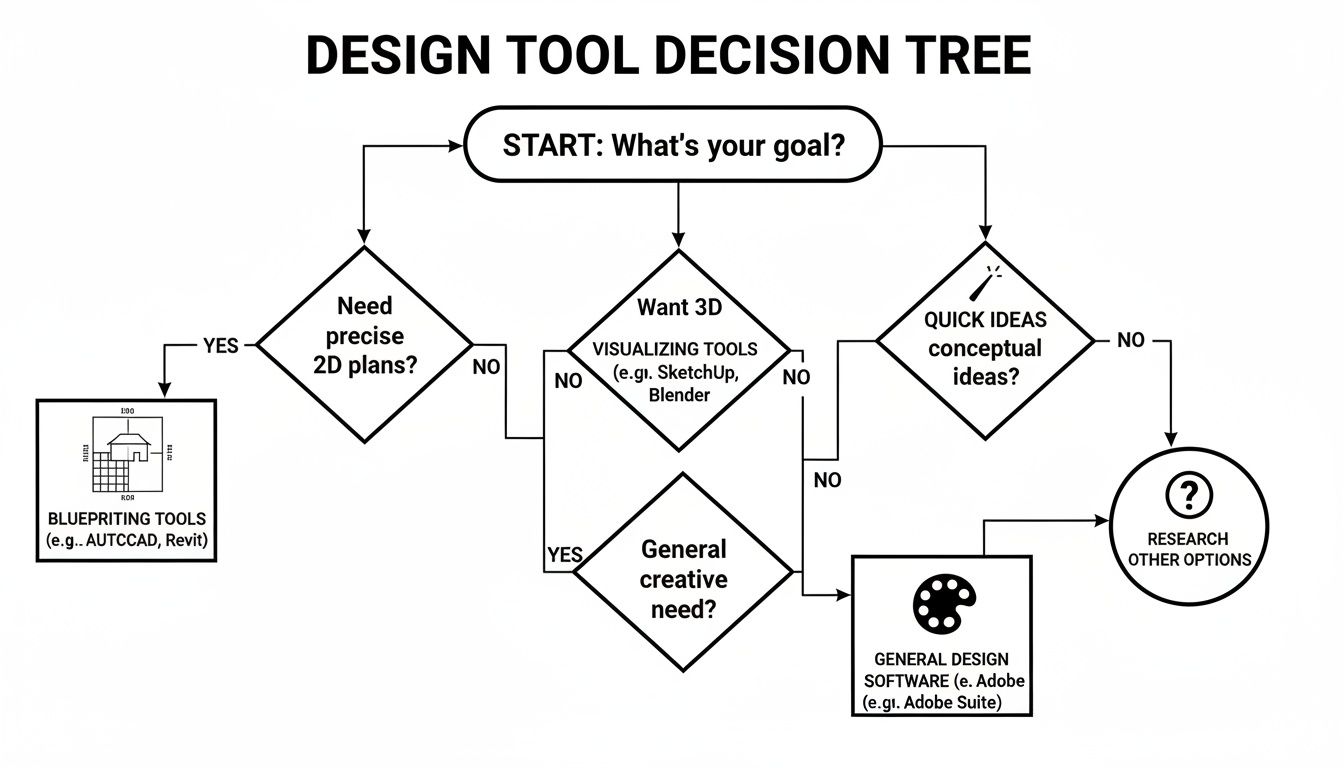
As you can see, there isn't a single "do-it-all" tool. It all starts with knowing what you want to achieve.
Making an Informed Decision
Choosing the right tool is about more than just features; it's about finding a partner in your creative process. To help you weigh your options, here’s a breakdown of what really matters for beginners.
Evaluating Software: What Matters for Beginners
A comparison of key evaluation criteria to help you choose the best interior design software based on your specific needs as a beginner.
Evaluation Criteria | Why It's Critical | What to Look For |
|---|---|---|
Ease of Use | A steep learning curve kills creativity. You need a tool that lets you start designing fast. | Intuitive drag-and-drop interface, clear navigation, and readily available tutorials or help guides. |
Templates & Style Library | Provides a starting point when you're unsure where to begin and helps you learn by example. | A diverse library of room layouts, furniture styles (Modern, Scandinavian, etc.), and color palettes. |
Photorealism | Helps you accurately visualize the final look and feel, making decisions much easier. | High-resolution renderings, realistic lighting effects, and accurate material textures (wood, fabric, etc.). |
Integrations | The ability to import real-world products or export your designs saves time and effort. | |
Pricing Model | Your budget shouldn't be a barrier to getting started. | A generous free tier for learning, flexible monthly subscriptions, or a one-time purchase option. |
By focusing on these practical criteria, you can cut through the noise and find software that truly supports your vision instead of complicating it.
This focus on user-friendly design is actually a huge industry trend. The global interior design software market was valued at USD 5.37 billion in 2024 and is expected to hit USD 5.91 billion in 2025. Even more telling, cloud-based tools are on track to capture 55% of the market by 2030. This massive growth is being driven by everyday people, just like you, who are now able to bring their design ideas to life. You can see the data on these interior design software market trends for a deeper dive.
By evaluating software based on ease of use, available templates, and rendering quality, you can confidently select a tool that will support your creative journey from start to finish.
Your First Design Project from Start to Finish
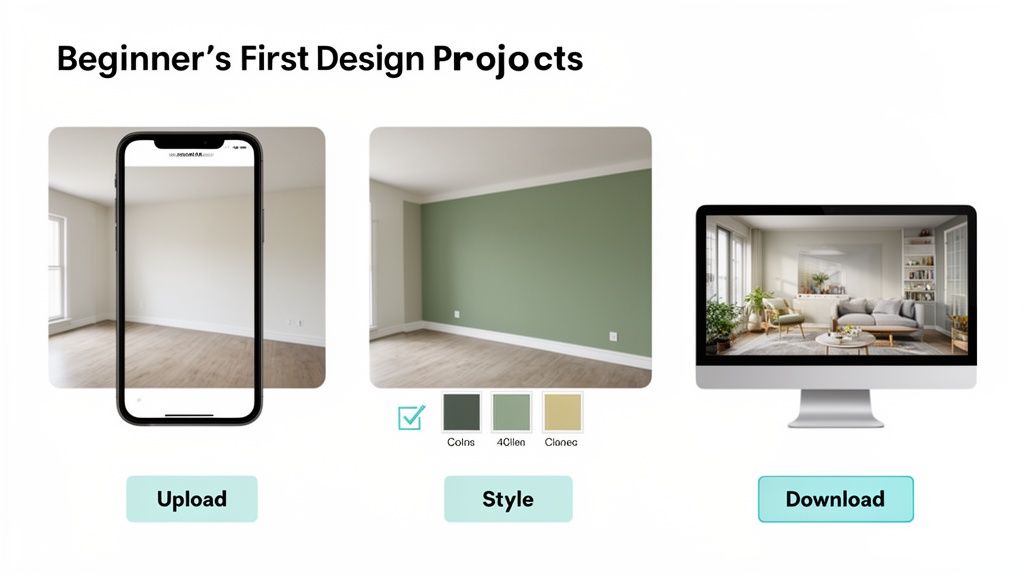
Okay, theory is great, but let's get our hands dirty. The best way to really get what interior design software for beginners can do is to walk through a project. We'll go from a basic "before" photo to a jaw-dropping "after" rendering. The whole process is designed to feel natural, turning what seems complicated into a few simple, creative clicks.
The big idea here is making good design accessible to everyone. You don't need to be a tech guru to get results that look like they came from a pro. The software does all the heavy lifting, so you can focus on the fun part: making your vision a reality.
The Five Steps to a Stunning Room Redesign
Think of this as your new favorite recipe for a room makeover. Just follow these five stages in order, and you can confidently transform any space, whether it’s a cluttered living room or a blank-slate bedroom.
Capture Your Starting Point: This is the easy part. Snap a clear, well-lit photo of the room you want to change, then upload it. That picture is now your digital canvas.
Generate Initial Ideas: Here's where the fun really starts. You can instantly see different looks by applying pre-set styles like "Modern," "Bohemian," or "Minimalist." Or, if you have something specific in mind, just type it out—like "cozy reading nook with a blue armchair and warm lighting"—to get a custom concept.
Experiment and Refine: Got a look you like? Now it's time to play. Swap out wall colors with a click, rearrange the furniture without breaking a sweat, and see how different textures look on the floors or curtains. This is your risk-free sandbox for perfecting the layout.
Polish the Details: It's the little things that truly bring a design to life. Tweak the virtual lighting to see how the room feels in the morning versus the evening. Good AI tools will even add realistic shadows and reflections automatically, making the whole scene feel real.
Download Your Vision: When you’re thrilled with the result, just download the high-quality, photorealistic image. This becomes your roadmap for the real-world project, ready to show your family or take with you when you go shopping.
From Concept to Practical Application
This simple workflow gives you the confidence to tackle real design puzzles. Once you get the hang of it, you can use these skills to figure out things like how to arrange bedroom furniture for a perfect layout that actually improves how the room feels and functions.
The whole point is to move from fuzzy ideas to a concrete, visual plan you can actually use. Each step builds on the last, taking the guesswork out of interior design.
If you want an even deeper dive, check out our guide on how to redesign your living room using AI technology. This simple, repeatable process is what makes modern design tools so empowering. It demystifies the whole creative journey, giving you a clear path from a spark of inspiration to a finished concept in minutes.
Common Mistakes to Avoid in Your First Design

Jumping into your first project is exciting, but a few common traps can trip up even the most enthusiastic beginner. The good news? Knowing what to watch for makes all the difference, turning potential headaches into a smooth, creative process.
One of the biggest mistakes is forgetting about real-world scale. It's so easy to get caught up in the digital sandbox and place a gorgeous sofa that would never actually fit through the door, or a tiny rug that looks completely lost. Always, always start by plugging in your room's actual measurements. This grounds your design in reality and makes sure every piece fits just right.
Misjudging Scale and Flow
Functionality is another hurdle. A room can look incredible in a 3D rendering, but if you can't comfortably walk around the furniture, the design has failed. You have to think about how people will actually move through the space.
The best designs are a perfect blend of beauty and practicality. Your software is a tool to help you achieve both, ensuring your virtual space is also a livable one.
Pay close attention to traffic flow—the pathways people naturally take. Good software is great for visualizing this, helping you spot and fix a beautiful but impractical roadblock before it becomes a real-life problem.
Overlooking Lighting and Color Harmony
Lighting is so often an afterthought for newcomers, but it’s what gives a room its mood and soul. A room with flat, boring lighting will feel sterile and fake, no matter how amazing the furniture is. Play around with different light sources in your design—add a floor lamp, hang a pendant, and see how the natural light from the windows interacts with everything.
It's also really common to get overwhelmed by color and end up with a palette that just doesn't work. Instead of choosing colors randomly, lean on a simple rule like the 60-30-10 guideline to keep things balanced:
60% Main Color: Think walls and large anchor pieces.
30% Secondary Color: This could be your furniture, curtains, or an accent wall.
10% Accent Color: Perfect for small pops in pillows, art, or decor.
This simple formula is a designer's secret for creating a cohesive look every single time.
Dodging these common mistakes will set you up for success from the very beginning. Newer tech is also a huge help here. Immersive tools like AR and VR, now found in 65% of top design apps, let you "walk through" your space to catch these issues early. This can boost decision accuracy by over 50% and seriously cut down on costly regrets—a big deal when so many renovation projects go over budget. These tools are bringing professional design principles to everyone. Discover more insights about interior design software trends.
Your Questions About Interior Design Software Answered
Jumping into any new tool can feel a little overwhelming, and it's totally normal to have a few questions. When it comes to interior design software for beginners, most people are wondering the same things: Is this really for me? What’s the catch with pricing? And how long until I can make something that actually looks good?
Let's tackle these head-on so you can start with confidence.
One of the biggest hang-ups is the fear that you need some kind of special experience. The short answer is a definite no. Modern tools are built from the ground up for people who are just starting their design journey. You don’t need to know anything about architectural drafting or complex blueprints.
Instead, you get simple, intuitive controls—think dragging and dropping a sofa into a room. The software handles all the tricky measurements and scaling in the background, freeing you up to focus on what matters: your creative vision.
Can I Use Real Products in My Designs?
Absolutely, and honestly, this feature is a total game-changer. The best platforms come packed with massive digital libraries of real furniture, lighting, and decor from brands you already know and love. This is what turns the software from a simple drawing tool into an incredibly practical planning partner.
You can design a space knowing every single item you place is real and available to buy. It's a critical bridge that ensures the beautiful room you create on screen can actually become a reality in your home, staying within your budget.
Free vs. Paid Software: What’s the Difference?
This is a big one for anyone just starting out. Free versions are fantastic for dipping your toes in the water. They let you get a feel for the basics and experiment with ideas without pulling out your wallet. Think of it as a test drive.
But, free plans almost always have some guardrails:
Project Caps: You might only be able to save one or two designs at a time.
Smaller Libraries: Your access to furniture and material options will likely be limited.
Lower-Quality Renders: The final images you create may not look as sharp or realistic.
Paid plans, which often come as a surprisingly affordable monthly subscription, unlock the software's true power. You usually get unlimited projects, the entire product catalog, and the ability to generate those stunning, photorealistic 3D images. For a small investment, you get a much more capable and flexible design toolkit.
The core difference is capability. A free plan is for learning the ropes, while a paid plan is for creating detailed, high-quality designs without restrictions.
How Quickly Can I Start Designing?
You'll be shocked at how fast you can get up and running. With software designed for beginners, you can go from signing up to laying out your first simple floor plan in less than an hour. The core features are designed to be immediately useful.
While it might take a bit more practice to master every advanced trick, you can absolutely produce a solid, well-thought-out room concept in a single afternoon. If you have more questions, you can explore our full list of frequently asked questions about interior design software to clear up any lingering doubts.
Ready to stop asking questions and start creating beautiful spaces? Decor8 AI makes it easy to bring your vision to life in minutes, no experience needed. Try it for free today!
Comments